> ## Documentation Index
> Fetch the complete documentation index at: https://stackone-hub-docs-confluence-api-token-update.mintlify.site/llms.txt
> Use this file to discover all available pages before exploring further.

# Teamtailor

> Follow these steps to connect Teamtailor with StackOne Hub successfully.

<Warning>
  Ensure you have Admin privileges for your Teamtailor account.
</Warning>

If you've been directed to StackOne to integrate with Teamtailor, the following steps will help you understand the process and any necessary actions to configure successful integration.

## Generating API key and getting Company ID

<Steps>
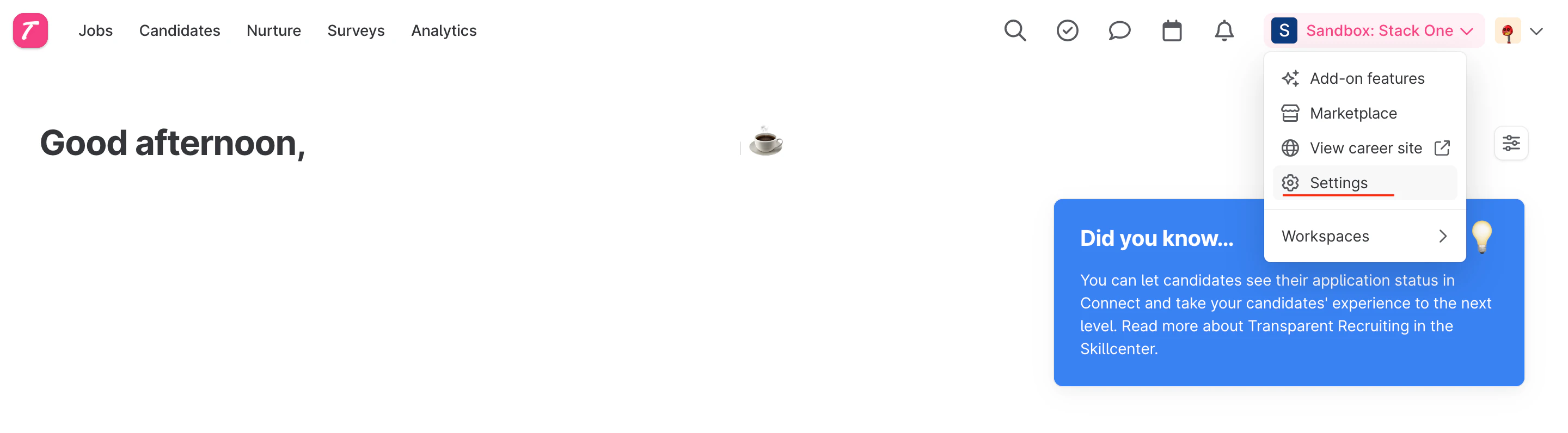
  <Step title="Navigate to Settings">
    In your Teamtailor account, click on Settings.
    <Frame>
      <img className="rounded-md" style={{ margin: '0 auto', border: '1px solid #efefef' }} alt="Settings" src="https://mintcdn.com/stackone-hub-docs-confluence-api-token-update/0zRfAlVllz5bF-yn/images/teamtailor/image1.png?fit=max&auto=format&n=0zRfAlVllz5bF-yn&q=85&s=9d55c88b27715d9dd24d5e56b0b26a5c" width="2880" height="796" data-path="images/teamtailor/image1.png" />
    </Frame>
  </Step>

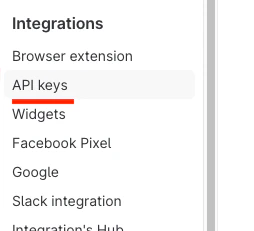
  <Step title="Find API Keys">
    On the left-hand menu under the integrations header, find API keys.
    <Frame>
      <img className="rounded-md" style={{ margin: '0 auto', border: '1px solid #efefef' }} alt="API Keys" src="https://mintcdn.com/stackone-hub-docs-confluence-api-token-update/0zRfAlVllz5bF-yn/images/teamtailor/image2.png?fit=max&auto=format&n=0zRfAlVllz5bF-yn&q=85&s=e583edd989471dc3ab56dfc6bda917d5" width="254" height="231" data-path="images/teamtailor/image2.png" />
    </Frame>
  </Step>

  <Step title="Create a New API Key">
    Click the New API Key button at the top right of the page.

    <Frame>
      <img className="rounded-md" style={{ margin: '0 auto', border: '1px solid #efefef' }} alt="New API Key" src="https://mintcdn.com/stackone-hub-docs-confluence-api-token-update/0zRfAlVllz5bF-yn/images/teamtailor/image3.png?fit=max&auto=format&n=0zRfAlVllz5bF-yn&q=85&s=98b57bd2dc0310fa3d0ae1fa88c1892b" width="864" height="138" data-path="images/teamtailor/image3.png" />
    </Frame>
  </Step>

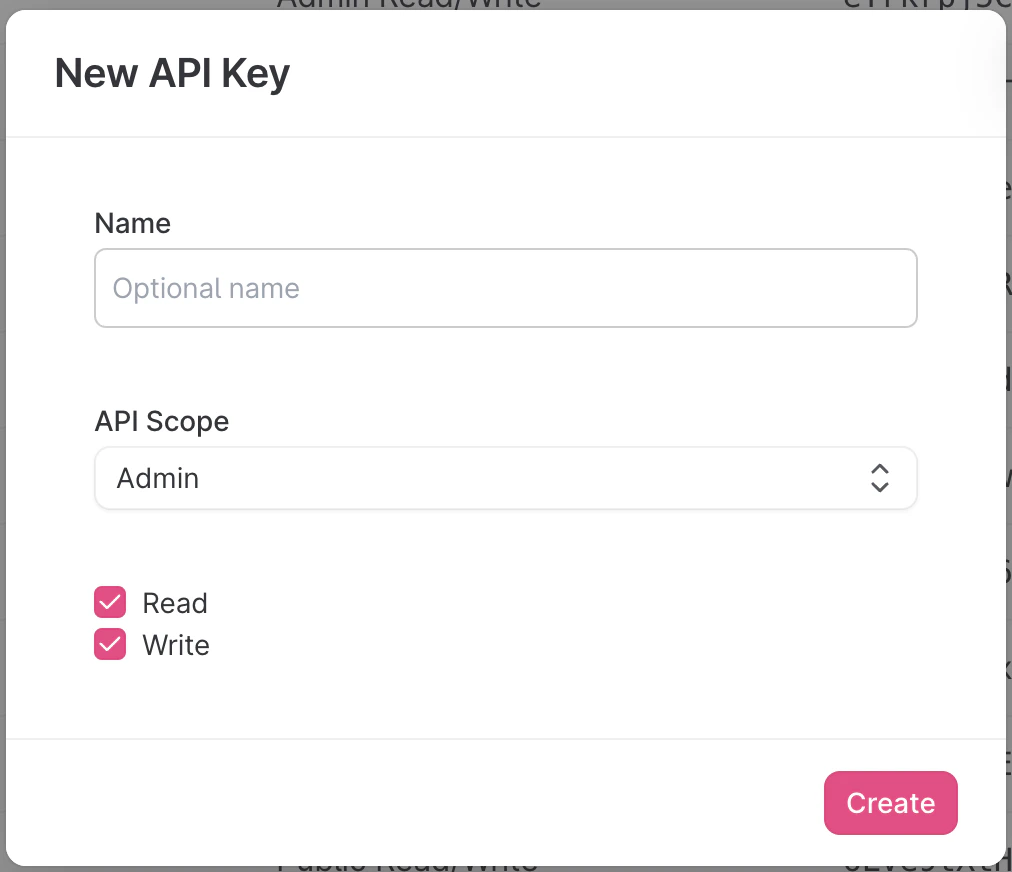
  <Step title="Set Name and Permissions">
    Enter a descriptive name, set the scope to `admin` and check both `read` and `write` permissions.
    <Frame>
      <img className="rounded-md" style={{ margin: '0 auto', border: '1px solid #efefef' }} alt="Set Permissions" src="https://mintcdn.com/stackone-hub-docs-confluence-api-token-update/0zRfAlVllz5bF-yn/images/teamtailor/image4.png?fit=max&auto=format&n=0zRfAlVllz5bF-yn&q=85&s=943e7b25270865c3773c16f38a2dd6f2" width="1012" height="872" data-path="images/teamtailor/image4.png" />
    </Frame>
  </Step>

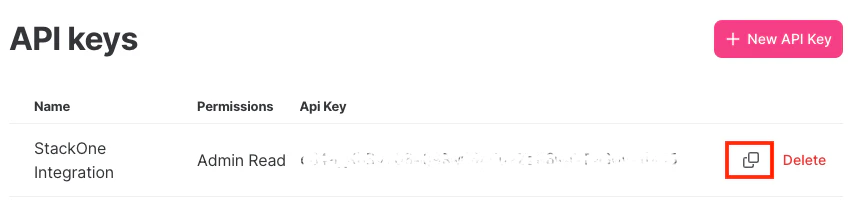
  <Step title="Copy API Key">
    Copy the API key to a safe place.

    <Frame>
      <img className="rounded-md" style={{ margin: '0 auto', border: '1px solid #efefef' }} alt="Copy API Key" src="https://mintcdn.com/stackone-hub-docs-confluence-api-token-update/0zRfAlVllz5bF-yn/images/teamtailor/image5.png?fit=max&auto=format&n=0zRfAlVllz5bF-yn&q=85&s=5a6413fe0d2c8615bef666a1eaba67f1" width="859" height="208" data-path="images/teamtailor/image5.png" />
    </Frame>
  </Step>

  <Step title="Get Company ID">
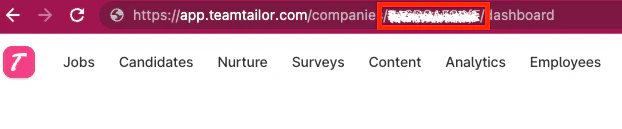
    Make a note of the `company ID`, which is part of the URL as shown below:
    <Frame>
      <img className="rounded-md" style={{ margin: '0 auto', border: '1px solid #efefef' }} alt="Company ID" src="https://mintcdn.com/stackone-hub-docs-confluence-api-token-update/0zRfAlVllz5bF-yn/images/teamtailor/image6.png?fit=max&auto=format&n=0zRfAlVllz5bF-yn&q=85&s=bf59e89f9517516d7f5b5fd709a93e6c" width="622" height="129" data-path="images/teamtailor/image6.png" />
    </Frame>
  </Step>
</Steps>

## Input the collected inputs into the StackOne Hub

<Steps>
  <Step title="Link Account">
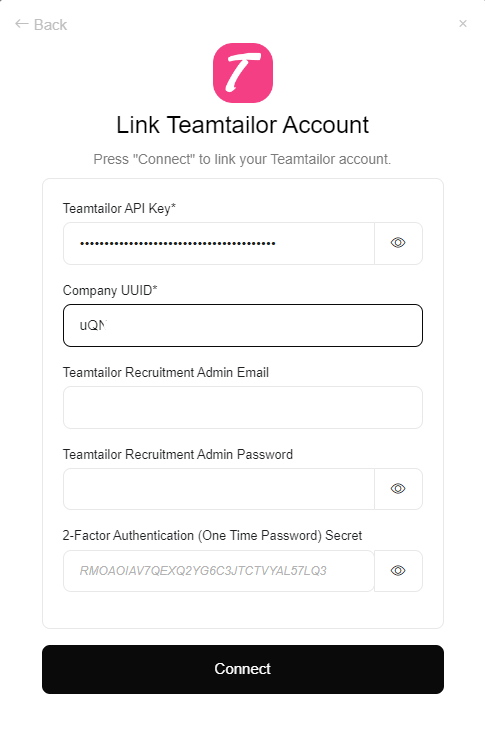
    Upon reaching the Link Account page, enter the gathered details and proceed by clicking the `Connect` button.
    <Frame>
      <img className="rounded-md" style={{ margin: '0 auto', border: '1px solid #efefef' }} alt="Link Account" src="https://mintcdn.com/stackone-hub-docs-confluence-api-token-update/0zRfAlVllz5bF-yn/images/teamtailor/image15.png?fit=max&auto=format&n=0zRfAlVllz5bF-yn&q=85&s=7af61a6fd710a7184dcfabf2b8370fd6" width="485" height="748" data-path="images/teamtailor/image15.png" />
    </Frame>
  </Step>
</Steps>

<br />

Congratulations, you're all set! If you face any issues with the steps mentioned above,
please contact us by emailing [integrations@stackone.com](mailto:integrations@stackone.com). We're always here to assist you!

## Useful Links

<Card title="API Reference" icon="link" href="https://support.teamtailor.com/en/articles/5963369-use-our-teamtailor-api">
  [https://support.teamtailor.com/en/articles/5963369-use-our-teamtailor-api](https://support.teamtailor.com/en/articles/5963369-use-our-teamtailor-api)
</Card>