> ## Documentation Index
> Fetch the complete documentation index at: https://stackone-hub-docs-confluence-api-token-update.mintlify.site/llms.txt
> Use this file to discover all available pages before exploring further.
# Bullhorn
> Follow these steps to connect Bullhorn with StackOne Hub successfully.
Ensure you have Admin privileges for your Bullhorn account.
If you've been directed to StackOne to integrate with Bullhorn, the following steps will help you understand the process and any necessary actions to configure a successful integration.
## Get your Client ID and Client Secret
These are unique identifiers for your account. If you do not possess this information, please contact Bullhorn Support or Submit a ticket via the Bullhorn Resource Center.
You will need to contact Bullhorn support to "add the following redirect URI: `https://api.stackone.com/connect/oauth2/bullhorn_iam/callback`".
## Connecting to StackOne
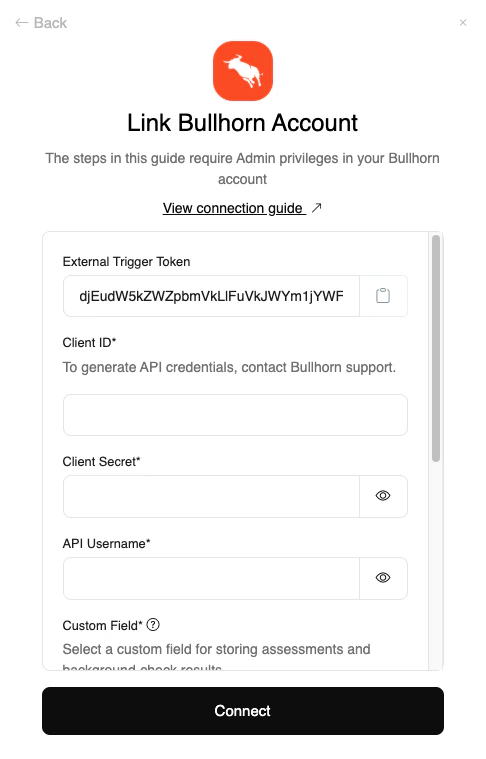
Upon reaching the Link Account page, enter the following credentials received from Bullhorn Support:
* Client ID
* Client Secret
* API Username
Proceed by clicking the `Connect` button.
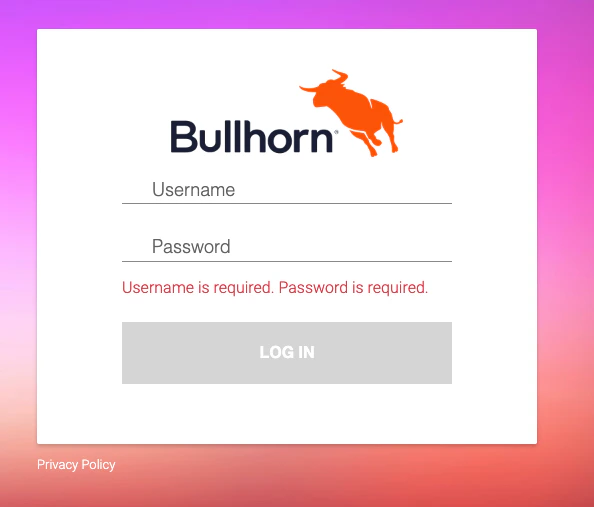
 In the window that appears, log in to your Bullhorn account to authorize account access.
Congratulations, you're all set! If you face any issues with the steps mentioned above,
please contact us by emailing [integrations@stackone.com](mailto:integrations@stackone.com). We're always here to assist you!
## Available data
This integration has the following [IAM Resources](https://docs.stackone.com/reference/getting-started-with-your-api) available from the provider:
## Useful Links
[https://bullhorn.github.io/Getting-Started-with-REST](https://bullhorn.github.io/Getting-Started-with-REST)