> ## Documentation Index
> Fetch the complete documentation index at: https://stackone-hub-docs-confluence-api-token-update.mintlify.site/llms.txt
> Use this file to discover all available pages before exploring further.

# TalentLMS - IAM

> Follow these steps to connect TalentLMS via the StackOne Hub successfully.

<Warning>
  Ensure you are a SuperAdmin or Account Owner in your TalentLMS account.
</Warning>

If you've been directed to StackOne to integrate with TalentLMS, the following steps will help you understand the process and any necessary actions to configure successful integration.

## Get Your TalentLMS Domain

<Steps>
  <Step title="Find Your Domain">
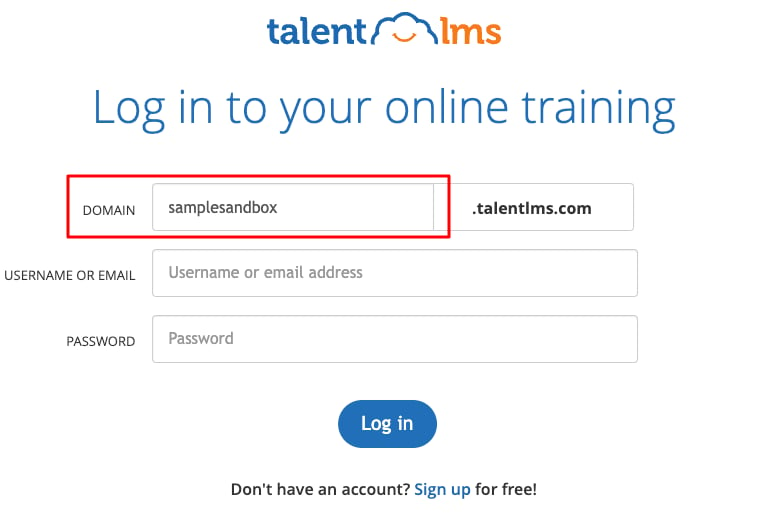
    Log in to your TalentLMS account. Your domain is visible in the URL.
    Example given the URL: `https://samplesandbox.talentlms.com/dashboard`
    The domain is `samplesandbox`.
    <Frame>
      <img className="rounded-md" style={{ margin: '0 auto', border: '1px solid #efefef' }} alt="Domain Example" src="https://mintcdn.com/stackone-hub-docs-confluence-api-token-update/0zRfAlVllz5bF-yn/images/talentlms/image1.png?fit=max&auto=format&n=0zRfAlVllz5bF-yn&q=85&s=377354742984ec63a0c2e0563a40529b" width="774" height="513" data-path="images/talentlms/image1.png" />
    </Frame>
  </Step>
</Steps>

## Get Your TalentLMS API Key

<Steps>
  <Step title="Navigate to Account Settings">
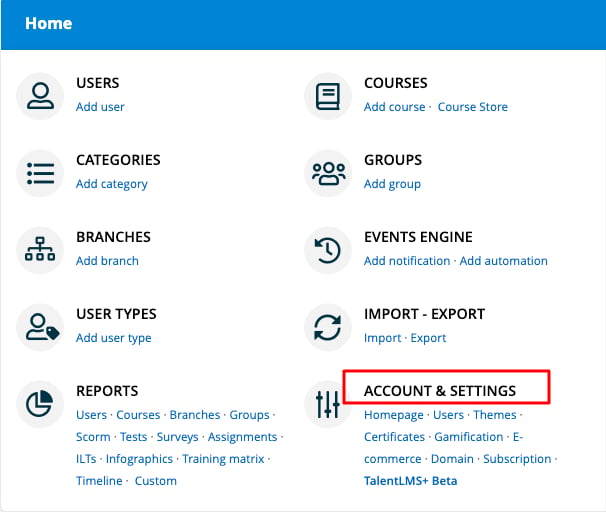
    Log in to your TalentLMS Dashboard, then click ACCOUNT & SETTINGS in the bottom right.
    <Frame>
      <img className="rounded-md" style={{ margin: '0 auto', border: '1px solid #efefef' }} alt="Account & Settings" src="https://mintcdn.com/stackone-hub-docs-confluence-api-token-update/0zRfAlVllz5bF-yn/images/talentlms/image2.png?fit=max&auto=format&n=0zRfAlVllz5bF-yn&q=85&s=b812fcfd2e1b22adc604f4fc4ddf5b59" width="606" height="512" data-path="images/talentlms/image2.png" />
    </Frame>
  </Step>

  <Step title="Enable API">
    Scroll down to the SECURITY section and checkmark the Enable API checkbox.

    <Frame>
      <img className="rounded-md" style={{ margin: '0 auto', border: '1px solid #efefef' }} alt="Enable API" src="https://mintcdn.com/stackone-hub-docs-confluence-api-token-update/0zRfAlVllz5bF-yn/images/talentlms/image3.png?fit=max&auto=format&n=0zRfAlVllz5bF-yn&q=85&s=eeaeb4cb161a2428e722ad8c2e9fd948" width="1740" height="248" data-path="images/talentlms/image3.png" />
    </Frame>
  </Step>

  <Step title="Copy API Key">
    Copy your displayed API Key and store it safely.

    <Frame>
      <img className="rounded-md" style={{ margin: '0 auto', border: '1px solid #efefef' }} alt="Copy API Key" src="https://mintcdn.com/stackone-hub-docs-confluence-api-token-update/0zRfAlVllz5bF-yn/images/talentlms/image4.png?fit=max&auto=format&n=0zRfAlVllz5bF-yn&q=85&s=992ad5e6ccabb95220683d9d087a41c7" width="1742" height="240" data-path="images/talentlms/image4.png" />
    </Frame>
  </Step>
</Steps>

## Connecting with StackOne

<Steps>
  <Step title="Enter API Key and Domain">
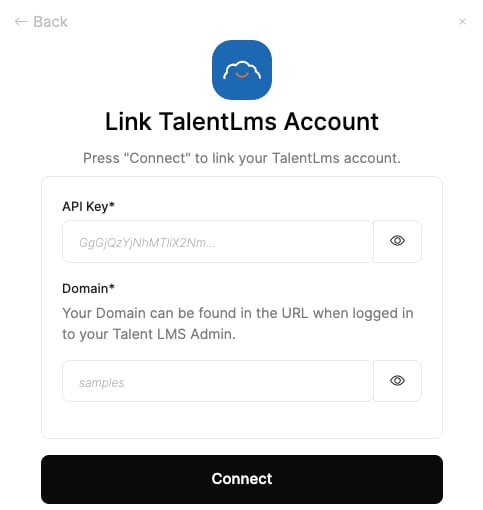
    Upon reaching the Link Account page, enter your API Key and Domain from the previous steps.
    <Frame>
      <img className="rounded-md" style={{ margin: '0 auto', border: '1px solid #efefef' }} alt="Link Account" src="https://mintcdn.com/stackone-hub-docs-confluence-api-token-update/0zRfAlVllz5bF-yn/images/talentlms/image5.png?fit=max&auto=format&n=0zRfAlVllz5bF-yn&q=85&s=bfa237d25cc437414f69d43163374aed" width="483" height="510" data-path="images/talentlms/image5.png" />
    </Frame>
  </Step>

  <Step title="Connect">
    Proceed by clicking the Connect button.
  </Step>
</Steps>

<br />

Congratulations, you're all set! If you face any issues with the steps mentioned above,
please contact us by emailing [integrations@stackone.com](mailto:integrations@stackone.com). We're always here to assist you!

## Available data

This integration has the following [IAM Resources](https://docs.stackone.com/reference/iam_list_users) available from the provider:

<ul>
  <li>Users</li>
  <li>Roles</li>
  <li>Groups</li>
</ul>

## Useful Links

<Card title="API Reference" icon="link" href="https://market.talentlms.com/pages/docs/TalentLMS-API-Documentation.pdf">
  [https://market.talentlms.com/pages/docs/TalentLMS-API-Documentation.pdf](https://market.talentlms.com/pages/docs/TalentLMS-API-Documentation.pdf)
</Card>
